Have you ever noticed why your phone camera recognizes your facial features? You are living with digital era where machine take up the decisions on their own. They can see, think, and analyze easily. This only happens because of the power of computer vision. Without a roadmap, you cannot start your career in computer vision.
You gain confidence just by doing multiple projects. You just need a core focus and consistency to do a lot of practice. In 2026, computer vision is opening doors of opportunity in healthcare, especially in robotics. In this article, you get a roadmap for computer vision for beginners interested in the machine learning field, along with its importance.
Why is Computer Vision Booming Everywhere in 2026?
Nowadays, computer vision is the center of attraction that enables the machine to understand and interpret visual data by analyzing images and videos. It is a hub of modern AI products and services. This field demands vision skills, which every company needs automation for digital cameras, sensors, and visual data for every sector.
Why do Beginners Need a Structured CV Roadmap?
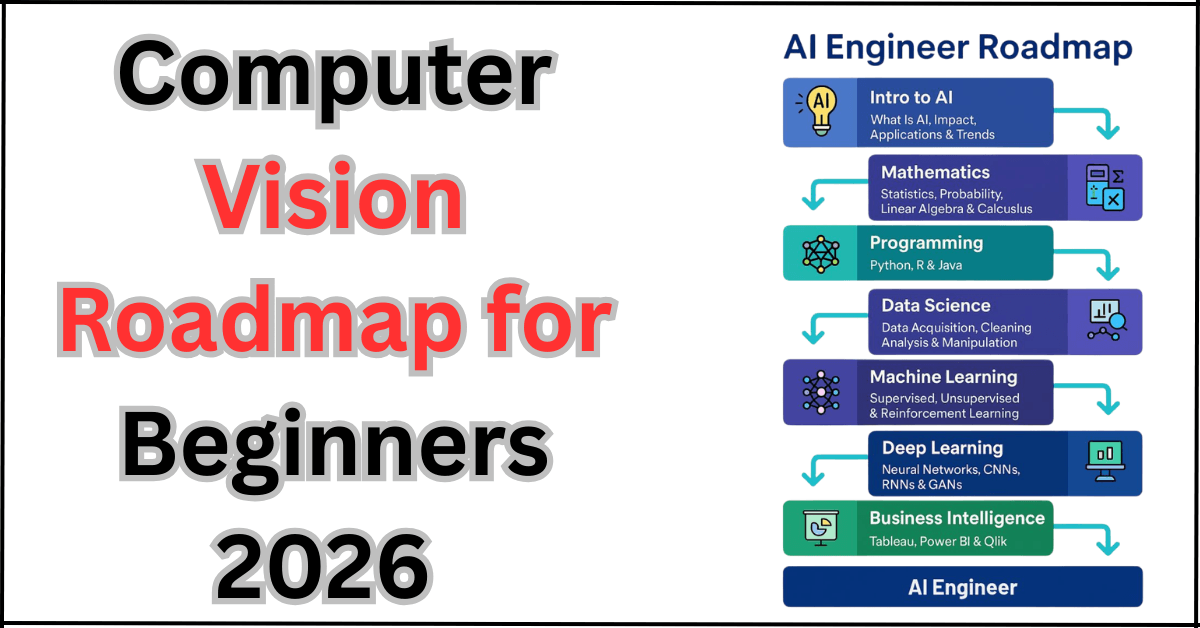
Beginners always need a roadmap for computer vision because there are many tools, models, datasets, and frameworks available, which can create a mess. If you do not have a roadmap, you catch yourself in confusion about which module you have to start first.
This structured computer vision roadmap 2026 also ensures that understanding the complex mathematics and complex coding moves you from theory to a practical journey. With a structured month path, you always know the next milestone. Your confidence goes high. Your motivation to know every step also rises when you move from one module to the next.
Complete Your Computer Vision Roadmap 2026: Step-by-Step Guidelines.
This computer vision beginner roadmap is divided into modules that start from month 1 to month 9. Each module has a different concept and purpose. Every module has specific tools and a project along with it. So, by the end, you have a shining portfolio with CNNs, object detection, segmentation, and model training.
You can follow this Computer Vision learning path 2026 as a self-study plan. Make your difficulty easier by adapting the knowledge, and when you increase the practice, you become a problem-solving expert sooner.
Module 1: Building Basic Foundations. (Month 1–2)
In module 1, you learn programming basics that make you an expert in coding ahead. You understand thoroughly how images are stored in computer RAM and how you find their addresses. You learn Python syntax, variables, loops, functions, and how to debug your code if any arbitrary changes are needed. You can write and run your code easily. You learn NumPy and Pandas, which help you work with arrays for repetitive tasks. You format tables so that images can be placed easily in numeric metrics.
You learn very basic image representation concepts such as pixels, channels, image shapes, and coordinate systems. The tools in this module you learn are Python, Jupyter Notebook, and Google Colab. You can easily experience smoother running in the browser without worrying about setup. When you do side-by-side smaller projects, like an image script or a simple grayscale converter. It enhances your experience of arrays and images, and how you can present an image in a pictorial way.
Module 2: Fundamentals of image processing. (Month 1–2)
Module 2, it introduces you with classics image processing, which is the foundation for most computer vision operations. You learn about filters and kernels. Also, this duration teaches you a lot about convolution on images and edge detection methods by using Sobel or Canny. The threshold method is used to separate the foreground and background of the image, as well as histograms for understanding the brightness and contrast of the image. There are many libraries you are used to, according to the coding platforms, but the main library here for this purpose is OpenCV.
Along with this, you used basic plotting tools like Matplotlib for visualization. You do mini projects like face detection by using Haar Cascades. This module empowers you with pre-trained detectors that work on webcams or image files. You also learn how to make filters and effects for an image to make it more enhance its features. You learn geometric transformations on the image, like blur, sharpen, rotate, crop, and resize, to gain comfort with OpenCV operations.
Module 3: Build your Machine Learning Concepts for Computer Vision. (Month2-3)
In module 3, you learn that the most important concept of computer vision is machine learning. You connect image processing with classical machine learning techniques. You learn how features are extracted, such as SIFT, HOG, and ORB. Similar descriptors are also used to extract images into feature vectors. Then you use algorithms from scikit-learn, such as logistic regression, SVMs, KNN, or Random Forests, to classify these features and make categories of pictures.
In this module, you make a handwritten digit classifier using simple features and a traditional ML model. Another project is a basic object classification pipeline in which you manually extract features using OpenCV and then train a classifier on those features using scikit-learn. These steps show how machine learning works in computer vision before you are introduced with deep learning.
Module 4: Concept of Deep learning for Computer Vision. (Months 3–4)
In Module 4, you are introduced to deep learning concepts and convolutional neural networks. These are the core concepts of modern computer vision. You learn what neural networks are and how they work. How layers and weight work and make a network worth. There are many activation like ReLU and softmax are used. Then you gain a worthwhile concept of CNN-specific ideas, such as convolutional, pooling, padding, and strides.
This module’s focus is on PyTorch, TensorFlow, and Keras. Also learn higher level of API’s. You do a mini project on a basic CNN image classifier on a simple dataset such as MNIST or CIFAR10. You handle many data loaders, model definitions, training loops, and evaluation. You can also experiment with style transfer to see how CNNs apply partition on the content and style images, which makes learning more fun and visual.
Module 5: Clearing your Basics with Modern Computer Vision Architectures. (Month 4–5)
In module 5, you learn how models are designed in the real world. After learning the basics of CNNs, you are able to design architectures like ResNet and EfficientNet. You apply techniques such as residual connections and compound scaling to achieve more accuracy and efficiency. The concepts of transfer learning and how models are tuned are the most focused zone of this module.
You apply repositories such as PyTorch Hub and TensorFlow Hub to load the pretrained models. You easily trained on large datasets like ImageNet. The projects you do in this module are any plant classifier or any animal classifier. You also do multi-class image classification, where you freeze some layers and fine-tune the final layers on your datasets.
Module 6: Learn to Place Object Detection and Tracking. (Month 5–6)
In module 6, you learn to place object detection and tracking. Your core focus is to mark the areas on the image that you do not want to see. You learn object detection concepts like bounding boxes, anchors, intersection over union, and non-max suppression, which help you perform best in object detection. The modern key detection models include YOLO, SSD, and Faster RCNN. Each has its own speed and accuracy.
You learn and also work with tools such as Ultralytics YOLO and Detectron2 to run pretrained detectors. You tune them and inspect their outputs. Projects you do in this module consist of high importance are COCO dataset or an open dataset with every object. You easily build a basic vehicle tracking system using detection and tracking algorithms to follow objects across video frames and run smoothly.
Module 7: Learn the Concepts Like Segmentation, OCR, and advanced CV. (Months 6–7)
In module 7, you move from basic to advanced tasks that take you to the next level. In the concept of segmentation, you learn the U-Net and Mask R-CNN, which assign a class label to each pixel. It helps you distinguish the foreground from the background. Especially in the medical field, you outline a specific organ or structure. These techniques help you a lot in medical imaging, autonomous driving, and robotics.
You also learn exciting features of OCR, including tools like Tesseract and transformer-based vision models. It easily reads text from images, such as scanning documents in the office or receipts for billing when you do groceries. Additionally, advanced topics include depth estimation from monocular images. You also learn human pose estimation, where models detect keypoints like joints. Projects you do in this module are medical image processing and building an OCR document reader.
Module 8: Learn to Deploy the models. (Months 7–8)
Module 8 specifically focused on creating the models from notebooks to real applications that users can access and experience a quality interface. You learn concepts like model optimization, quantization, and conversion to ONNX (Open Neural Network Exchange). You also learn TensorRT to run models faster on CPUs and GPUs.
You learn in real-time inference targeted easily for webcam processing and edge devices. The main tools you used in this period are Rest APIs, Docker, and TensorRT for optimized inference. Projects you do in this phase are a deployed object detection API that takes an image and returns detected objects. This phase strengthens your skills in computer vision engineering.
Module 9: Building portfolio and industry-grade projects.
Final module 9 teaches you a lot and rewards your patience by polishing your portfolio. It covers all your struggles, showcasing what you learn and what you will do for the market. From this computer vision roadmap 2026, until now, you learn alot, but during this period, how do you list up your learning? In your portfolio, you build a CNN classifier, an object detection project, and a segmentation or OCR project.
Each project has a clear code repository and a short demo. You do add more projects to your portfolio: A retail product detection system. AI-based medical scan analyzer. Face recognition attendance system. These projects highlight your ability to the hiring team that you can solve real problems. They do not need any demo; your portfolio speaks a lot.
FAQ’s:
What are the best skill sets needed to kickstart computer vision in 2026?
To kickstart your career in computer vision in 2026, you should have a strong foundation in Python programming. basic mathematics and machine learning concepts.
How long does a beginner take to complete up its compter vision journey?
For a computer vision journey, if a beginner has a strong foundation in programming, then they will take nearly 4 to 6 months to master this skill. With a zero background learner, you need 9 to 12 months to master it with consistency and multiple practices.
What are the real applications of computer vision in 2026?
The real applications of computer vision in 2026 are feature recognition systems, self-driving vehicles, and retail automations.
Conclusion:
Your journey of the computer vision roadmap for beginners 2026 is not all about learning code; in fact, it is about building vision and making a real-world impact. From starting your journey, mastering the Python basics, to the end of the course, with the practical projects, your chances of being hired increase. You just need consistent efforts and drilling to grab these skills.
Reference Link:
https://onlinelibrary.wiley.com/doi/full/10.1155/2018/7068349