
The logical data model diagrams generated by AI are revolutionizing the collaboration between data designers and developers. The manual process of defining every entity and relationship has been changed to the usage of AI tools that can give a structured diagram by interpreting the text descriptions or business rules.
This method supports the design process, cuts down human mistakes, and enables the teams to visualize and confirm their database schema at an early stage. The AI is already in the picture for the modeling of customer orders as well as product systems, and thus, faster, smarter, and more collaborative data structure creation.
What is an AI-generated logical Data Model?
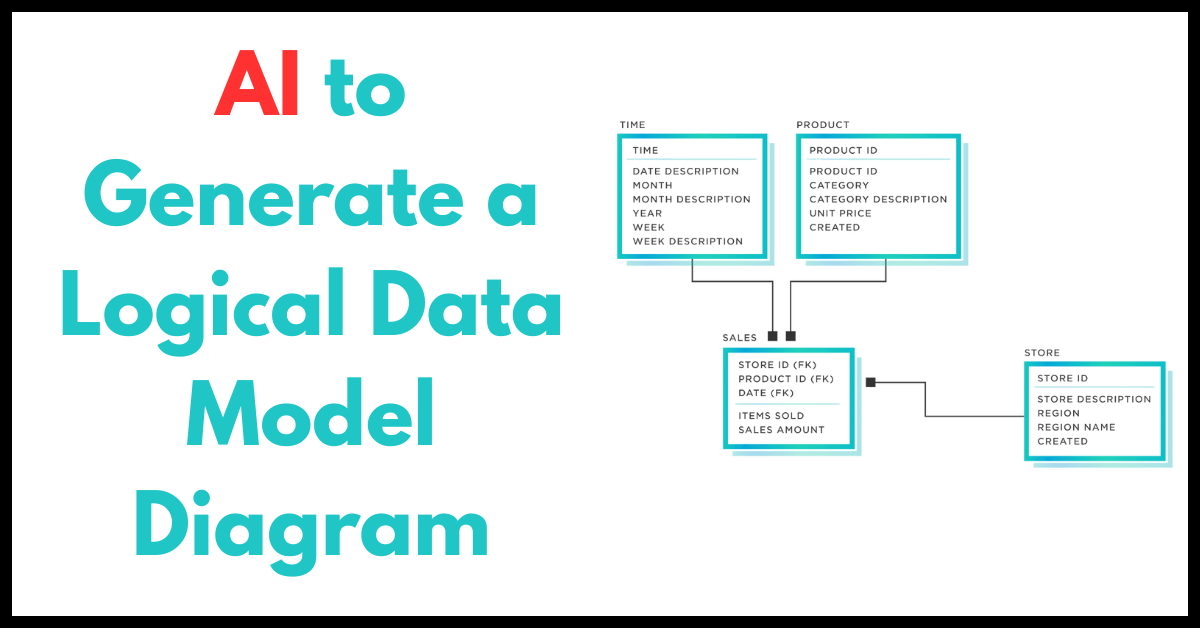
When AI generates a logical data model, it creates the structure (entities, fields, relations) without worrying about the specific database. It’s “automatic data model diagram generation” where AI suggests the model from input such as text, business rules, or existing schema. The result is a logical data model with AI tools, ready for review and improvement.
Why Use AI for Database Schema Design?
- Speed: AI can produce a first draft in seconds.
- Consistency: It applies naming, relationships, and rules uniformly.
- Prototype before code: You get something visual before writing SQL.
- Better collaboration: Share the AI diagram with business experts for feedback.
These advantages make AI for database schema design very attractive.
Tools for AI Diagram Generation
Some tools or approaches you can try are given below:
- Eraser’s AI ERD Generator: Generate entity-relationship diagrams from prompts or code snippets.
- Miro ER Diagram AI: Describe your data model in words and get an ERD visually.
- Soft builder AI ER Diagrams: Automatically turn input into ER diagrams you can review.
- Workik AI Schema Generator: Uses natural language to create schema diagrams from your description.
When you choose a tool, check whether it outputs editable diagrams or code you can evolve further.
How to Use AI to Generate Your Logical Data Model Diagram
Here is the step-by-step process:
- Gather your requirements in text form
Write business rules: entities, relationships, keys, attributes. - Prompt the AI tool
Use clear prompts like: “Create a logical data model with Customer, Order, Product entities and their relations.” - Review the suggested model
Check entity names, cardinalities, and attributes. Fix or refine the AI’s suggestions. - Export to diagram or code
Many tools allow export as ERD, SQL DDL, or JSON schema. - Iterate with feedback
Ask stakeholders to review and give corrections. Use new prompts or adjust manually.
Best Practices for Better AI Models
To get better results, follow these tips:
- Use consistent naming in your input (singular/plural, upper/lower case).
- Provide examples of relationships: “one-to-many”, “many-to-many”.
- Include optional constraints or remarks.
- Use smaller chunks if the domain is big: generate subsystem models, then integrate.
- Always validate AI output with domain experts.
Benefits & Drawbacks
Benefits
- Faster modeling and prototyping
- Fewer mistakes in relationships or naming
- Easy to evolve and adjust diagrams
- Helps non-DBA stakeholders understand early
Drawbacks
- AI may misinterpret ambiguous requirements
- Complex constraints or business logic might be missed
- Needs human review and correction
- Vendor lock-in or export limitations are possible
Use AI as a starter, not the final designer.
Comparing AI-Generated vs Manual Diagrams
| Aspect | AI-Generated Diagrams | Manual Diagrams |
| Speed | Much faster; creates diagrams in seconds. | Slower; requires manual design effort. |
| Creativity | Limited; follows given input and rules. | High; humans add context, logic, and nuance. |
| Accuracy | May miss complex edge cases. | More precisely, humans catch subtle errors. |
| Iteration | Enables quick revisions and versioning. | Changes take more time to implement. |
| Best Practice | Combine AI speed with human validation. | Combine AI automation for the best overall results. |
Use Cases & Examples
- A SaaS startup uses prompt + AI to generate entity relations for new features.
- Migrating legacy spreadsheets: AI reads column names and suggests logical models.
- Team collaboration: Business users describe data in text, and AI returns diagrams for discussion.
These show how automatic data model diagram generation can help in real projects.
Future Trends
- AI models that learn from your past database designs.
- Integration of AI data modeling into IDEs or data platforms.
- AI that suggests optimizations: normalization, redundancy removal, and indexing strategy.
- Better integration between the logical data model with AI tools and downstream physical schema tools.
As AI improves, logical modeling will become more intelligent and less manual.
FAQs
1. How do you generate diagrams using AI?
The AI can generate diagrams by asking for a natural language description of your data or system. Then, based on your input, the AI tools will create the visual diagrams like ERD, UML, or flowcharts in a very structured manner.
2. Which AI can generate UML diagrams?
To produce UML diagrams, AI applications are used, such as Miro AI, Lucidchart AI, and Eraser.io. Just tell the AI about the system’s classes and relationships, and it will skillfully turn your text into a proper UML structure.
3. Which AI can generate ERD diagrams?
Applications like Soft Builder AI, Eraser.io, and Workik AI Schema Generator are capable of generating ERD diagrams. The products can depict the relationships in a database by means of text prompts or sample data to produce the corresponding entity-relationship diagrams.
4. How to create a data model diagram?
To create a data model diagram, start by identifying the different entities and the connections between them. AI tools or diagram software, such as Eraser.io, can automatically convert your text or data into a well-structured visual model.
Conclusion
AI has revolutionized the way people present their ideas and thoughts in writing, and logical data model diagrams are no exception. More so, these electronic drawings or schematics can ease the burden of the database design.
The use of AI tools will enable teams to swiftly generate accurate data model prototypes, carry out visual reviews of the structures, and then make adjustments according to the feedback. As technologies progress, the combination of AI automation and expert insight will be the hallmark of the future in terms of data modeling that is smart, reliable, and efficient.
References:
https://link.springer.com/content/pdf/10.1007/978-1-4615-5643-5_8?pdf=chapter%20toc
https://dl.ucsc.cmb.ac.lk/jspui/bitstream/123456789/4634/1/2018%20MCS%20047.pdf